Tampilkan postingan dengan label how. Tampilkan semua postingan

How to Remove Arcade Parlor Uninstall Guide

Senin, 21 Juli 2014

Arcade Parlor is an adware program that displays pop-up ads that very often may have nothing to do with the web page content, quick-flash re-directs via commercial web pages and injects in-text ads when visiting certain sites such as Amazon.com, eBay.com, etc. It may display in-text ads on other websites as well. This is the price you pay for supposedly free games you get when you agree to install this adware program on your computer. Of course, its up to you to decide whether you want to keep it or not, but since it displays ads and collects information about your browsing habits I think you would be better off without it. Using this guide you will be able to easily remove all traces of the Arcade Parlor adware from your computer and browser.


Once installed, this adware will add browser add-ons to IE, Firefox and Chrome. These add-ons can access your data on all websites and access your tab browsing activity. Furthermore, the adware uses scheduled tasks run in the background to check for new updates. Scheduled tasks start every time that you start Windows and use system resources without your knowledge and permission. It may download and install additional adware on your computer.


Its very important that you pay attention to the license agreements and installation screens when installing anything; otherwise you can easily end up with Arcade Parlor and similar adware on your computer. If an installation screen offers you Custom or Advanced installation options, it is a good idea to select these as they will typically disclose what other 3rd party software will also be installed and allow you to opt out of them. If you cant seem to get rid of Arcade Parlor or you have additional questions, please leave a comment below. Good luck and be safe online!

Written by Michael Kaur, http://deletemalware.blogspot.com


Arcade Parlor removal instructions:

1. First of all, download recommended anti-malware software and run a full system scan. It will detect and remove this infection from your computer. You may then follow the manual removal instructions below to remove the leftover traces of this infection. Hopefully you wont have to do that.


2. Remove Arcade Parlor program from your computer using the Add/Remove Programs control panel (Windows XP) or Uninstall a program control panel (Windows 7 and Windows 8).

Go to the Start Menu. Select Control Panel → Add/Remove Programs.
If you are using Windows Vista or Windows 7, select Control Panel → Uninstall a Program.


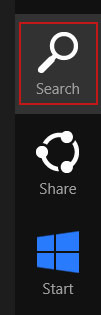
If you are using Windows 8, simply drag your mouse pointer to the right edge of the screen, select Search from the list and search for "control panel".


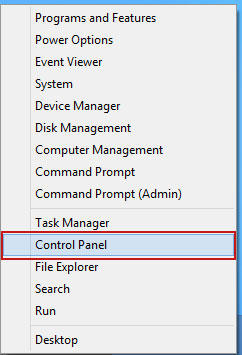
Or you can right-click on a bottom left hot corner (formerly known as the Start button) and select Control panel from there.


3. When the Add/Remove Programs or the Uninstall a Program screen is displayed, scroll through the list of currently installed programs and remove Arcade Parlor and any other program you recently installed.
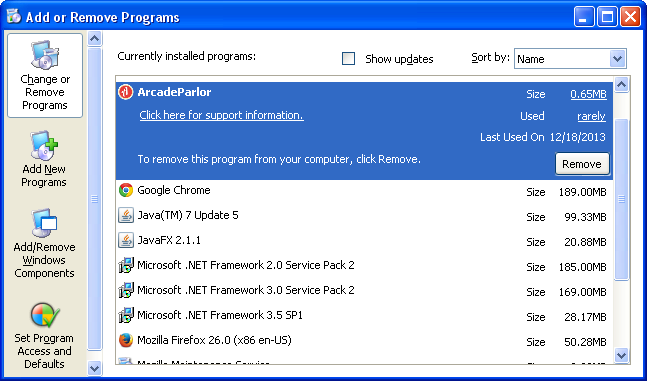


If you are using Windows Vista, Windows 7 or Windows 8, click Uninstall up near the top of that window. When youre done, please close the Control Panel screen.


Remove Arcade Parlor from Google Chrome:

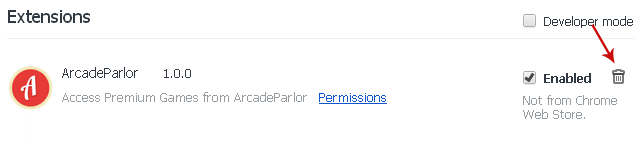
1. Click on Chrome menu button. Go to Tools → Extensions.
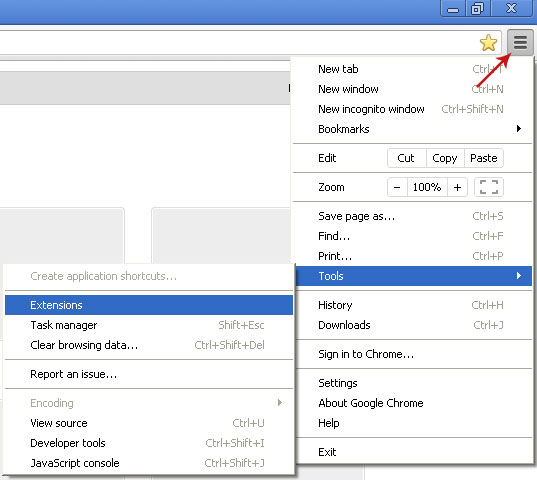


2. Click on the trashcan icon to remove the Arcade Parlor 1.0.0 browser extension.


Remove Arcade Parlor from Mozilla Firefox:

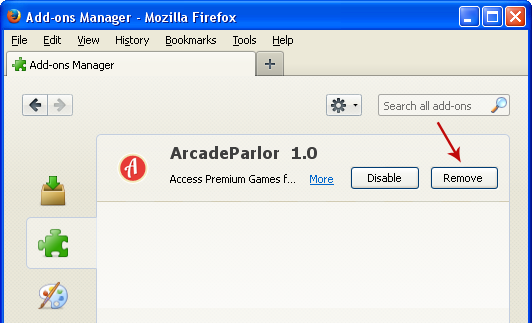
1. Open Mozilla Firefox. Go to Tools → Add-ons.


2. Select Extensions. Click Remove button to the Arcade Parlor 1.0 browser extensions.


Remove Arcade Parlor from Internet Explorer:

1. Open Internet Explorer. Go to Tools → Manage Add-ons. If you have the latest version, simply click on the Settings button.


2. Select Toolbars and Extensions. Click Remove/Disable button to remove the Arcade Parlor browser add-ons.
Read More..

Home computer How to Wenger SwissGear DIANA Womens Computer Case 15 12 5 x 4 x 17 5 MicroFiber Vinyl Black GA771302F00

Senin, 14 Juli 2014

Learn how to Wenger SwissGear DIANA Women's Computer Case - 15" - 12.5" x 4" x 17.5" - MicroFiber, Vinyl - Black GA771302F00 on sale

Scores: Wenger SwissGear DIANA Women's Computer Case - 15

Wenger SwissGear DIANA Women's Computer Case - 15

Wenger SwissGear DIANA Women's Computer Case - 15" - 12.5" x 4" x 17.5" - MicroFiber, Vinyl - Black GA771302F00 available

The DIANA women's computer case is designed to fit personal belongs along with a laptop and its accessories. SwissGear DIANA GA-7713-02F00 Carrying Case for 15.4in. Notebook - Black is one of many Laptop Cases available through Office Depot. Made by SwissGear.

Read more »
Read More..

How to Remove Total Protect Uninstall Guide

Kamis, 26 Juni 2014

Total Protect is a fake antivirus program that generate misleading pop-up warnings, reports non-existent security threats on your computer and attempts to trick you in to buying software to remove viruses and other malicious software. This rogue anti-virus product can also slow your computers performance significantly and block legitimate programs or Windows tools. There are literally hundreds of fake AVs on the Internet meant to scare people into installing additional malware on their computers and giving their credit card numbers to cyber criminals. Total Protect is made to look like Microsoft Security Essentials, but its not legitimate. If your computer does become infected by this fake anti-virus program, please scan your computer with anti-malware software. To remove Total Protect from the computer, please follow the removal instructions below.


Total Protect - Professional Antivirus Solution typically appears when you visit a fake online virus scanner or infected website. However, scam artists use social engineering to trick users into installing malicious software as well. If you have stumbled onto a fake security scanner or fake pop-up alert saying that your computer is infected – dont click anything and close your web browsers. Unfortunately, cyber criminals also use drive-by downloads and software exploits to install Total Protect malware and other viruses on the computer even without users knowledge and consent. Thats why you should always enable your anti-virus software and keep it up to date and active.

Fake Total Protect security alerts:


The official website of this rogue antivirus software is totalprotectav.com. Its a mixed up website, some parts are clearly taken from legitimate antivirus vendors websites. For example, they use Bit Defender logo and they also claim that Kaspersky, Panda, Avira and some others are their partners. Thats a complete lie.


Important: never enter your credit card or personal information into a program like Total Protect. If you have already bought this rogue anti-virus program, please contact your credit card company and dispute the charges. Then do a full scan with an up-to-date reputable antivirus software. Coming across such fake antivirus software as Total Protect can be scary, but it actually cant delete your files or spy on your computer unless it comes bundled with other malware but its really uncommon. If your computer is infected with Total Protect, please follow the steps in the removal guide below to remove it from your computer. If you have any questions or need help removing this fraudware, please leave a comment below. Good luck and be safe online!


Total Protect removal instructions:

1. Reboot your computer is "Safe Mode with Networking". As the computer is booting tap the "F8 key" continuously which should bring up the "Windows Advanced Options Menu" as shown below. Use your arrow keys to move to "Safe Mode with Networking" and press Enter key. Read more detailed instructions here: http://www.computerhope.com/issues/chsafe.htm


NOTE: Login as the same user you were previously logged in with in the normal Windows mode.

2. Download free anti-malware software from the list below and run a full system scan.
NOTE: in some cases the rogue program may block anti-malware software. Before saving the selected program onto your computer, you may have to rename the installer to iexplore.exe or winlogon.exe With all of these tools, if running Windows 7 or Vista they MUST be run as administrator. Launch the program and follow the prompts. Dont forget to update the installed program before scanning.

3. New threats appear every day. In order to protect your PC from such (new) infections we strongly recommend you to use ESET Smart Security.


Associated Total Protect files and registry values:

Files:

Windows XP
  • C:Documents and Settings[UserName]Application DataRtlDriver32.exe
Windows Vista/7
  • C:Users[UserName]AppDataRoamingRtlDriver32.exe
Registry values:
  • HKEY_CURRENT_USERSoftwareMicrosoftWindowsCurrentVersionRun "[SET OF RANDOM CHARACTERS].exe"
Share this information with other people:
Read More..

How To Choose Pc Service Atlanta

Minggu, 01 Juni 2014

By Marissa Velazquez


Getting a personal machine is an easy task. However, you should ensure that you have the best plan to maintain it. Problems may arise with its software or hardware due to different reasons. Look for a good company that can offer the best PC service Atlanta to avoid getting faulty repairs. These can be quite costly in the long run, and you will end up experiencing losses.

There are several factors you should consider when looking for such services. Any company that provides such services should also offer a warranty for the repair. This will work to your advantage especially when the repair does more harm than good. If the company does not guarantee that they will cushion your losses, look for another option.

Some problems are easy to detect and fix. Try following the normal procedures of starting a computer to see if you missed any step, maybe switching on the power supply, or properly connecting the cable to the socket. This is a very common issue that does not require any expert advice to fix. Also, ask a friend to look at it and try and detect the root cause of the problem, especially if you do not have much knowledge about machines.

Look for these companies on the internet as it is the easiest way to find them. Such websites offer information on the scope of their work. It is also advisable to get recommendations from friends and other IT experts on the best companies to offer such services. Ensure that you get enough reviews from previous customers so that you can know whether their services are top notch.

The company should have employees who are qualified to provide such services, both academically and professionally. They should possess the appropriate documentation to prove such. Licensing of the business by the relevant authorities is important so that the services provided are under the correct authority. It should be valid and for the current business period.

Make a point of meeting with the person to explain to them what the problem is in detail. A skilled person will ask the relevant questions like the behavior of the machine before, during and after the problem began. Make sure that you do not leave important information out as it may shed a lot of light as to what the root of the problem is.

Keep a backup of all the data that you have in your computer. Some procedures especially those involving software repair will require the company to install new software, and this may end up erasing all the data you had. Hardware repairs may not need you to back up your data, but you should just do it as a precautionary measure.

Most PC service Atlanta that are performed under a warranty are usually not paid for. That is a standard requirement so you should ask questions in case you are asked to pay. However, any issues that arise after the warranty has expired have to be paid for. Payments are usually performed under the warranty that has been issued with the machine.


About the Author:


Read More..

Laptop computer Learn how to repair Startech Computer Products Server Racks CABSCREWM62 Startech M6

Kamis, 29 Mei 2014

Ways to solve Startech Computer Products Server Racks CABSCREWM62 Startech M6 Special

Reviews: Startech Computer Products Server Racks CABSCREWM62 Startech M6

Startech Computer Products Server Racks CABSCREWM62 Startech M6

Startech Computer Products Server Racks CABSCREWM62 Startech M6 Special offer

Install your rack-mountable hardware securely with these high quality screws and nuts. This 100 Pack of M6 Mounting Screws and Cage Nuts for Server Racks and Cabinets is convenient to have on hand for installing server, network, AV and other rackmount equipment securely into your storage cabinet or server rack. The pack includes 100 screws and 100 nuts, providing enough mounting hardware to setup any rack you might be working on. Backed by a StarTech.com lifetime warranty. StarTech.com 100 Pkg M6 Mounting Screws and Cage Nuts for Server Rack Cabinet is one of many Server Racks/Mounts available through Office Depot. Made by StarTech.com.

Read more »
Read More..

Laptop computer Learn how to repair Hewlett Packard E1Z94UTABA 800ed Twr I5 3 2 4GB 500GB W7p w8p64 Sby

Selasa, 20 Mei 2014

Ways to solve Hewlett Packard E1Z94UTABA 800ed Twr I5/3.2 4GB 500GB W7p-w8p64 Sby Special

Reviews: Hewlett Packard E1Z94UTABA 800ed Twr I5/3.2 4GB 500GB W7p-w8p64 Sby

Hewlett Packard E1Z94UTABA 800ed Twr I5/3.2 4GB 500GB W7p-w8p64 Sby

Hewlett Packard E1Z94UTABA 800ed Twr I5/3.2 4GB 500GB W7p-w8p64 Sby Special offer

UPC: 887758591147 Weight: 27.500 lbs

Read more »
Read More..

How To Get The Best Bargain Whenever Buying Power Amplifiers

Senin, 31 Maret 2014

By Mike Heller


Selecting a decent amplifier for your loudspeakers is not a trivial chore. You wish to make certain that your amplifier matches your speakers. I will clarify some important amplifier terms and give some recommendations to help you select the perfect amplifier.

Audio amplifiers appear in all different shapes and sizes. They use different technologies and have many technical specs. By following some simple rules, you will be able to pick the type that best fits your application and budget.

Amplifiers vary in their size and range from types that will take up a good part of your living room whilst some of the latest mini amplifier types are as small as a deck of cards. A large number of amps are the size of a typical rack. This enables your amp to be stacked on top of your other audio equipment. The huge majority of recent audio amplifiers are solid state amplifiers versus more conventional tube amplifiers. Tube amplifiers have been dominant a decade or so ago. Regrettably, tube amps have relatively large audio distortion which describes how much the audio signal is degraded by the amplifier.

Tube amps will have audio distortion of up to 10%. Solid state amplifiers will have less audio distortion depending on the amplifier technology that is utilized. Several of the most accepted technologies in the past have been "Class-A" and "Class-AB" technologies. These technologies use different arrangements to amplify the sound. Amps based on any of these technologies are also named "analog amplifiers". While amplifiers employing these technologies normally have low audio distortion, power efficiency is only 10% to 30%. This means that the majority of the electrical power provided to the amp is wasted as heat while a tiny fraction is used to amplify the audio signal.

In comparison, "Class-D" amps which are also known as "digital amplifiers" have a power efficiency of usually 80 to 90%. This allows the amp and power supply to be made a great deal smaller than analog amplifiers. The downside is that many digital amplifiers have larger audio distortion than analog amplifiers though several of the latest types make use of a feedback mechanism to minimize distortion to levels of 0.05% and less.

"Class-D" amplifiers, on the other hand, which are also named "digital amplifiers" have a power efficiency of no less than 80% and are smaller and have a smaller power supply than similar analog amplifiers. The disadvantage is that many digital amps have larger audio distortion than analog amplifiers although some of the latest types employ a feedback mechanism to reduce distortion to levels of 0.05% and less. The amp should be able to deliver adequate output power to sufficiently drive your speakers which will depend not only on how much power your loudspeakers can handle but also on the size of your listening environment. Speaker power handling is given as peak power which describes the maximum amount of power during short bursts while average power refers to how much power the loudspeakers can handle constantly.

If you have a fairly small listening area then 20 to 50 Watts of power should be sufficient despite the fact that your loudspeaker might be rated for 100 Watts or more. Low-impedance speakers generally offer high sensitivity and are easier to drive to high volume than high-impedance loudspeakers. Be sure that your amplifier can drive your speaker impedance. You can without problems find the rated speaker impedance range in your amplifiers user manual.

Last but not least, be certain that your amplifier introduces little noise and has a broad enough frequency response. High-quality amps will have a signal-to-noise ratio of no less than 100 dB and a frequency response of a minimum of 20 Hz to 20 kHz.


About the Author:


Read More..

How to use Twitter Bootstrap with Asp Net MVC 3

Minggu, 09 Maret 2014

What is Twitter Bootstrap (TB) ?
  • TB is a Free (open source) collection of tools for creating web applications
  • It contains HTML and CSS-based design templates for typography, forms, buttons, charts, navigation and other interface components
  • As well as optional JavaScript extensions
  • TB has supported for HTML5 and CSS 3
  • It is compatible with all major browsers
  • It also supports Responsive Design
           - This means the graphic design of web pages adjusts dynamically, taking into account
              the characteristics of the device used (PC, tablet, mobile phone)


Twitter Bootstrap


How to Download Twitter Bootstrap ?


Step 1 :

Download Twitter Bootstrap

Step 2 : 
  • After unzip the content,You will have below mentioned folders
After unzip the content

  • CSS folders content is as below

CSS folders content

  • IMG folders content is as below

IMG folders content

  • JS folders content is as below

JS folders content


How to create Asp.Net MVC 3 project using Visual Studio 2010 ?

Step 1 :  Click,  File ==> New Project

New Project


Step 2 :  Select, Internet Application Template

Select, Internet Application Template


Step 3 :  MVC 3 Internet Application Template generated Solution Explore is as below

Complete project


How to add Twitter Bootstrap UI Framework for Asp.Net MVC 3 project ?

css and img :
  • Create a folder named "bootstrap" under the Content folder
  • Create 2 sub-folders named "css" and "img" under that
  • Add the .css files into css folder and .png files into img folder

Note: The framework assumes that the .png images are located under a folder
           named "img" under the parent folder of the folder in which the .css files are located  

scripts :
  • Create a folder named "bootstrap" under the Scripts folder
  • Add the bootstrap javaScript files into it

After that solution explore looks like below

Complete project


Lets try to add Bootstrap effects into our Asp.net MVC project

How to Add the Bootstrap CSS ?
  • Open the _Layout.cshtml page
  • Add the following 2 lines in the head tag at the end of its existing content
  • You dont need to remove any of its existing content   
  • You need to make sure that bootstrap-responsive.min.css appears after the bootstrap.min.css 

<head>
<link href="@Url.Content("~/Content/bootstrap/css/bootstrap.min.css")"
      rel="stylesheet" type="text/css" />
<link href="@Url.Content("~/Content/bootstrap/css/bootstrap-responsive.min.css")"
      rel="stylesheet" type="text/css" />
</head>


How to Add Bootstrap JavaScript ?
  • It is a good practice to add the JavaScript files at the end of the page content
  • Add the following line at the end of the _Layout.cshtml file before ending the body tag

<script src="@Url.Content("~/Scripts/bootstrap/bootstrap.min.js")"
        type="text/javascript"></script>


Lets add some Twitter Bootstrap css styles for our Asp.Net MVC UIs

Site.css
  • Open the Site.css file
  • Look for the "header h1, #header h1" styled item
  • Replace it with the following code block   

header h1, #header h1
{
    font-weight: normal;
    padding: 5px 0;
    margin: 0;
    color: #5c87b2;
    border: none;
    line-height: 2em;
    font-size: 20px !important;
    text-shadow: 1px 1px 1px #111;
}

  • Look for #logindisplay, #logindisplay a:link, #logindisplay a:visited and #logindisplay a:hover styled items
  • Change the color property to #555 instead of white
  • Replace it with following code block   

#logindisplay
{
    font-size: 1.1em;
    display: block;
    text-align: right;
    margin: 10px;
    color: #555;
}

#logindisplay a:link
{
    color: #555;
    text-decoration: underline;
}

#logindisplay a:visited
{
    color: #555;
    text-decoration: underline;
}

#logindisplay a:hover
{
    color: #555;
    text-decoration: none;
}

Lets Modify Body 
  • Open _Layout.cshtml page
  • Replace it with following code block  

_Layout.cshtml (complete code)

<!DOCTYPE html>
<html>
<head>
<meta charset="utf-8" />
<title>@ViewBag.Title</title>
<link href="@Url.Content("~/Content/Site.css")" rel="stylesheet"
      type="text/css" />
<link href="@Url.Content("~/Content/bootstrap/css/bootstrap.min.css")"
      rel="stylesheet" type="text/css" />
<link href="@Url.Content("~/Content/bootstrap/css/bootstrap-responsive.min.css")"
      rel="stylesheet" type="text/css" />
</head>

<body>
    <div class="container-fluid">
        <div id="header" class="row-fluid">
            <div id="title">
                <h1>
                    My MVC Application</h1>
            </div>
            <div id="logindisplay">
                @Html.Partial("_LogOnPartial")
            </div>
        </div>
        <div id="" class="row-fluid">
         <div class="navbar">
           <div class="navbar-inner">
             <div class="container-fluid">
               <div class="nav-collapse">
                 <ul class="nav">
                   <li class="@(ViewBag.Active == "Home" ? "active" : "")">
                       @Html.ActionLink("Home", "Index", "Home")
                    </li>
                    <li class="divider-vertical"></li>
                    <li class="@(ViewBag.Active == "About" ? "active" : "")">
                       @Html.ActionLink("About", "About", "Home")
                    </li>
                  </ul>
               </div>
             </div>
          </div>
         </div>
        </div>
      <div id="" class="row-fluid">
         @RenderBody()
      </div>
      <div id="footer" class="row-fluid">
      </div>
    </div>

    <script src="//ajax.googleapis.com/ajax/libs/jquery/1.9.0/jquery.min.js">
           </script>
    <script src="@Url.Content("~/Scripts/bootstrap/bootstrap.min.js")"
            type="text/javascript"></script>
</body>
</html>


Lets Modify Home Page
  • Open Index.cshtml page
  • Replace it with following code block 

Index.cshtml (complete code)

@{
    ViewBag.Title = "Home Page";
    ViewBag.Active = "Home";
}
<div class="hero-unit">
    <h2>@ViewBag.Message</h2>
    <p>
        This is a template to demonstrate the way to beautify the default
        MVC3 template using Twitter Bootstrap website. It is pretty
        simple and easy.
    </p>
    <p>
        <a href="http://asp.net/mvc" class="btn btn-primary btn-large"
           style="color: White;">
         To learn more about ASP.NET MVC visit &raquo;</a>
    </p>
</div>


Lets Modify About Page
  • Open About.cshtml page
  • Replace it with following code block 

About.cshtml (complete code)

@{
    ViewBag.Title = "About Us";
    ViewBag.Active = "About";
}
<div class="row-fluid">
    <div class="span4">
        <h2>
            About 1</h2>
        <p>
            Your About 1 details.Your About 1 details.Your About 1 details.
            Your About 1 details.Your About 1 details.Your About 1 details.
            Your About 1 details.Your About 1 details.Your About 1 details.
        </p>
        <p>
            <a class="btn" href="#">View details &raquo;</a></p>
    </div>
    <div class="span4">
        <h2>
            About 2</h2>
        <p>
            Your About 2 details.Your About 2 details.Your About 2 details.
            Your About 2 details.Your About 2 details.Your About 2 details.
            Your About 2 details.Your About 2 details.Your About 2 details.
        </p>
        <p>
            <a class="btn" href="#">View details &raquo;</a></p>
    </div>
    <div class="span4">
        <h2>
            About 3</h2>
        <p>
            Your About 3 details.Your About 3 details.Your About 3 details.
            Your About 3 details.Your About 3 details.Your About 3 details.
            Your About 3 details.Your About 3 details.Your About 3 details.
        <p>
            <a class="btn" href="#">View details &raquo;</a></p>
    </div>
</div>


Thats it.Youre done.

  • Now the Asp.net MVC 3 project with Twitter Bootstrap Template should look like below

Home page (portion)

Home page


About page (portion)

About page


Do you need to Download This Sample Project ?


Do you need to dive deep ends of  Twitter Bootstrap ?


Conclusion
  • Bootstrap is a Toolkit from Twitter designed to kick-start development of web-apps and sites
  • You can design highly professional and more sophisticated web sites with minimum effort by using Bootstrap
  • It is Tested and supported in the major modern browsers, such as the Latest versions of Safari, Google Chrome, Firefox 5+, and Internet Explorer 7+
  • With Bootstrap 2.0 and later, Mobile browsers are also supported
  • So Try to use TB with your web projects and Enjoy it 


I hope this helps to You.Comments and feedback greatly appreciated.

If you feel it was a good article,Give me a +1.Thank You.


Happy Coding.

May Be Useful for You

How to Improve jQuery Selector Performance ?
How to Enable jQuery Intellisense in Visual Studio 2010 ?
Read More..