Windows 8 Released to the World But is it Good

Kamis, 12 Juni 2014

The wait is finally over, Microsoft Windows 8 is officially here. The newest iteration of the worlds most popular computer operating system was released today after months of demos and commercials showcasing it. Microsoft has said that over 1.24 billion hours of testing went into the new operating system and is in many ways hedging the future of the company on the new release. Because of the increased pressure from Apple and Google, Microsoft wants to assure consumers that they are still relevant in todays world.

Windows 8 marks a radical change for Microsoft in terms of the layout of their operating system. Gone is the traditional start menu, replaced by an entirely new start interface with "live tiles" and an array of downloadable applications from the all new Windows Store. Current windows users will notice a drastic change from Windows 7 to Windows 8. While the traditional "desktop" is still there, it is no longer the center of the computers processes, and more of a "background application". Part of Microsofts reason for making such drastic changes to the interface is to make their operating system compatible across more devices. Microsoft is trying to not only keep hold of the traditional PC market, but also branch into tablets and smartphones. Windows 8 is truly built more for new hybrid, touch-based computers and tablets more so than traditional desktops, though it is built to run on those as well.

Having already downloaded Windows 8 to my laptop early this morning, I have only had a short time to interact with it. That being said, I noticed one thing right away, there is a steep learning curve. The interface, short of the traditional desktop which is now essentially an "app", is completely different. Even for someone that is very familiar with the way Windows computers work, navigating Windows 8 is in many ways a whole new experience. That is not to say that all is bad. I do like the modern interface that Microsoft has introduced, and I like many of the new, full screen applications that are available from the Windows Store. I also like the deep integration with all Microsoft services, if you have an email account, that allows many settings and files to be synced over the cloud.

There are, however, plenty of drawbacks, at least currently, to Windows 8. For starters, nothing is where it used to be. Just trying to turn the computer off takes multiple steps that may take users a while to figure out. Also while Windows 8 is "easy" to navigate, it is more so for a touch screen rather than a traditional computer. A traditional keyboard and mouse feel "out of place" in this new user interface, save for when working with the traditional desktop. I understand Microsoft wanting to make Windows 8 touch friendly for tablets and new touch-enabled computers, but traditional computers upgraded to the new OS feel a bit neglected. In addition, the current offering of applications in the Windows store is very limited, and until more popular applications are added, it will suffer.

Overall, my opinion of Windows 8 is still up in the air. While I think it is a must have if you are looking for a new, touch enabled PC, it is not yet a necessary upgrade for existing computers. If Microsoft continues to add new, relevant applications to its Windows Store and allows easier ways to interact with the traditional desktop, then I think it will truly be useful to everyone. It remains to be seen how the radical change in design will impact sales of the operating system, but one thing is certain right now, it is a new age for Microsoft and for the future of personal computers.

Read More..

Undetectable Trojan on Windows 7 SP1 and AVG Anti Virus Free Edition 2012

Rabu, 11 Juni 2014

Maybe someone out there think that their systems are safe when anti-virus programs are installed and the firewall is enabled. However, it is not true.


This video is to proof that anti-virus program and firewall can be bypassed. This video is going to WARN you all NOT to download any pirate software and cracked software as well as NOT to download any software from any untrusted source.


The technique used in the video can be used in any file format, such as video, pdf, photo/picture, audio and executable file.


About the video


The demo Windows 7 SP1 in the video is in default settings upon installed.


- Windows 7 SP1 is fully updated as on April 11, 2012.

- AVG Anti-Virus Free Edition 2012 is installed and fully updated as on April 11, 2012.

- UAC is set to default on Windows 7 SP1.

- Firewall is enabled and no extra program is allowed (default settings).

- AVG Anti-Virus Free Edition 2012 has no whitelist set


As a result, the Trojan Injected PuTTY program is undetected by AVG Anti-Virus program and UAC/Defender on Windows 7 SP1 as well as firewall.


Thats all! See you.
Read More..

What to Know Before You Upgrade From XP to Windows 7

Selasa, 10 Juni 2014

What to Know Before You Move From XP to Windows 7
With Windows 7 coming out next month, there are, no doubt, a lot of Windows XP users who opted to skip over Windows Vista and are anxiously awaiting the opportunity to upgrade. Unfortunately, the switch may not be such an easy one. There is a lot of planning to do and a lot of learning to be done, but with the Windows 7s October 22 release date just around the corner, its never too early to start.

One of the first things you will want to do is check your hardware. If your computer was made in the last few years, you more-than-likely wont have a problem. If youre not sure about your current hardware situation, Microsoft offers a Windows 7 Upgrade advisor at their website. The advisor will perform a scan of your system and display a report that lets you know if you meet the requirements. Should there be a problem, the report lets you know what your options are for the upgrade.

Another thing you must understand is that you will have to perform a custom installation. Upgrading from Windows XP to Windows 7 will not allow you to keep all of your settings and applications. A custom installation gives you the option to install Windows on a specific drive or partition, or completely replace your old operating system. When you do the complete replacement, a folder called "Windows.old" will show up on your hard disk and while it will contain your Windows, Documents, Settings, and Program Files, your applications will no longer be in working order. This means backing up and transferring important data, reinstalling applications, and reconfiguring your settings.

Its always helpful to have an inventory of all of your applications. Youll also want to make sure they are compatible with Windows 7. Once you have your list in place, you can gather up the information for what youll need once youve got Windows 7 installed including installation CDs and various websites from which youve downloaded applications.

One thing you may want to consider is a multiboot configuration. This means having both Windows XP and Windows 7 at your fingertips, which can help make the switch a little smoother. All you have to do is reboot into Windows XP at any given time to see exactly how something is installed or configured. To do this, you must install both XP and 7 on the same hard disk but on separate partitions. To make room for Windows 7, you will have to repartition your hard disk and there is software you can purchase to help you do this. Once youre finished, just set Windows 7 as your primary operating system and remove Windows XP all together.

As with any major change you make to your computer, youll want to back up all of your data. Youre more than likely going to use either a third-party back-up program or Windows XPs native Backup Utility. If youre using a third party program, make sure you check with your manufacturer to see if it will be compatible with Windows 7. If youre not sure or dont trust either backup system, you can, of course, make copies of all of your data and store it on CDs and external hard drives.

Now that you know you will need to transfer your data, how will you do it? Youll probably want to use a program that will scan your XP system to find all of your data and settings and that can transfer the information to Windows 7. Luckily, Windows 7 has an Easy Transfer feature that can do this for you, but. The transfer utility should come embedded within Windows 7, but also as a separate DVD.

Something else you can do to be prepared is become familiar with Window 7s new user interface (UI) as it is very different from that of Windows XP. To avoice what many call "UI Shock," you can visit Microsofts Windows 7 webpage. That will give you an idea of what to expect once youve installed Windows 7. The webpage features a Windows 7 Features section and a Windows 7 Help & How-to section. Microsofts website also features a Windows Training Portal which includes Windows 7 "Learning Snacks" (interactive presentations) and Microsoft Press Sample Chapters from upcoming Windows 7 books.

Finally, this seems simple enough but ask questions and share information. So many people will be switching from XP to Windows 7; you most certainly wont be alone. Visit technical forums and websites and connect with others who are in your shoes.

Read More..

Buffalo Introduces 4TB TeraStation in America

Senin, 09 Juni 2014

TerraStation WSSCES was home to a ton of new tech this year including the 4TB TerraStation WSS. Buffalo Technology, who has been a global leader in the development, design and manufacturing of wireless and wired networking, network and direct attached storage solutions, unveiled at CES 2010 the TerraStation WSS which utilizes Windows Storage Server.
The TerraStation incorporates a new x86 hardware platform. This allows the TerraStation to feature four quick-swap SATA hard drives as well as redundant RAID technology and a heavy-duty power supply which provides a dependable and cost effective storage solution. The TerraStation also utilizes Windows NTFS file system providing excellent file security for the SMB as well as really granular folder and file permissions. If you add this to the native Active Directory support then you get a new and really-cost effective solution to the SMB.

According to Ralph Sagnola, Vice President if Sales for Buffalo Technology, "Buffalo technology has been a leader in the SMB storage space and incorporating Windows Storage Server is just the next step. The latest TerraStation WSS is Buffalo delivering on its ongoing commitment of producing high quality, robust storage solutions to the SMB market that are not only cost effective but are also able to meet the high demands of todays business needs."

The TerraStation features Windows Storage Server 2003 R2 Express Edition. This helps businesses store and protect all of their digital assets. Setup for the TerraStation is easy is easy and it is also easy to manage plus it gives you all the power of a Windows server operating system to provide feature-rich file sharing. The TerraStation has support for protocols like SMB, AppleTalk, NFS and Netware and the TerraStation WSS also allows data to be shared along different platforms. Native integration with the Active Directory service provides a simplified management for customers operating in a Windows domain environment.

The TerraStation WSS is backed by a three-year warranty which includes 24/7 technical support. Two different models will be available, a 2TB (WS-Q2.0TL/R5) for $1,599.99 and the 4TB (WS-Q4.0TL/R5) for $1,999.99.


Looking for Computer / PC Rental information? Visit the www.rentacomputer.com PC Rental page for your short term business PC needs. Or see this link for a complete line of Personal Computer Rentals.
Read More..

PQI Debuts Worlds Smallest USB 3 0 Flash Drive

Minggu, 08 Juni 2014

PQI U819VI love USB flash drives. I think these little suckers are one of the best things to hit computers since sliced bread. I used a flash drive almost every day this past semester of school and boy was it a nifty thing to keep around. Almost every piece of school work I had to do this past semester is on my trusty 2GB Toshiba flash drive.

Now, my flash drive is your average one. It is nearly the same size as all other flash drives and is able to be clipped on my key chain or stuck in my pocket.However, Im sure there are some of you reading this that prefer your flash drive to be tiny and really easy to carry around with you.

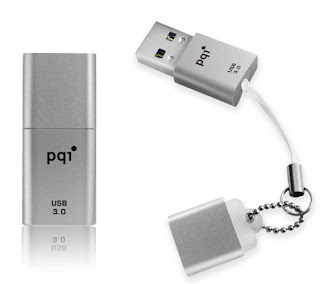
Well, if tiny is how you like your gear, then you will definitely want to check out the newest USB 3.0 flash drive released by PQI because this little guy is just that, little. This newest flash drive out of PQI is known as the Traveling Disk Drive U819V and is, as PQI claims, the smallest USB 3.0 flash drive in the world.

When PQI says that this thing is small, they mean that this thing is small. The U819V measures a mere 3cm long and comes with a removable cap that is attached to the USB drive via a lanyard. The U819V uses COB encasement technology which surrounds the components in order to keep them cool by helping dissipate the heat generated while in use. The arch nemesis to technology is heat, especially when it comes to memory that loses performance as it heats up.

You can get the U819V in a plethora of storage sizes ranging from 4GB up to 32GB if you really really need all that space. The device measures 3.15 x 14.8 x 7.3mm making it the perfect size to lose as soon as you open it. It weighs 3.6 grams and works with both USB 2.0 as well as USB 3.0 ports. Data transfer when connected to USB 3.0 is claimed to be 5Gbps, which is pretty good.

Pricing of the U819V has yet to be determined but dont be surprised if these little buggers are a little more expensive than your run of the mill flash drives. Word of warning, dont blow a lot of money on the 32GB if you are in the habit of losing things.

Source: SlashGear - PQI outs worlds smallest USB 3.0 flash drive


Put your eye on the problem with Camera Security Now, installing security cameras since 1999. We install in the US and we can help you do it yourself.


Call us toll free 877-422-1907 between 8am EST and 5pm PST M-F. Talk to an expert about your serious security camera needs.

Read More..

Technical Blogging Tips 1 million page views and lessons learned in technical blogging

Sabtu, 07 Juni 2014


Firstly, thanks to all my followers and readers for your support in reaching this milestone of 1 million page views.


Here are a few technical blogging tips based on my experience.

1. You need to be patient and keep at it

It took me around 9 months to go from 100 to 4000 daily page views. It was a gradual and slow process, and  I promoted my site via publishing articles at www.javalobby.com and helping out fellow professionals via industry specific forums like www.javaranch.com. Paid attention to Google key words that are not highly competitive and ensured that my contents had the key words to come up on google search for key words like "Java interview questions". The Google analytics revealed the following growth.


2. Sign-up to Google, and get the right tools 


-- track your progress and gather metrics (e.g. Google analytics) 
-- Sign up for Google adsense  to earn a small passive income.
-- Feedburner to enable your readers to subscribe to your bog feeds.
-- Google+ to network with your followers.


3. Pay attention to "repeated visitors" and "bounce rate" in Google analytics

Google analytics is a great tool to monitor how well your blog is doing. Two of the key metrics that I constantly look at are

The number of returning or repeated visitors. The slow and steady increase in this number indicates that you are getting some loyal readers who like reading your blog posts.

Jan 2012: 2,825 
Feb 2012: 4,007 
March 2012: 7,131 
April 2012: 10, 321
May 2012: 14,304 
June 2012: 19,122
July 2012: 22, 327 
Aug 2012: 24, 390 
Sep 2012: 25, 994

The "bounce rate" needs to be kept around  70% or less

You cant please everyone who comes to your site. Make sure that the landing page is interesting and informative enough to keep the bounce rate below 70%. If the bounce rate is high, then the problems may include irrelevant information, poor design or that your campaign is targeting unqualified visitors, too many advertisements putting people off, the content is not unique enough and freely available in many other sites, etc. You need to come up with an idea that will differentiate both your site and your content from others in the same niche. Not easy, but possible. For example, there are so many matured sites on "Java Tutorials" and very hard to compete on. The small number of tutorials provided in this blog are mainly to provide some familiarity with the sought-after technologies and frameworks.The real differentiating factor for this site is proving quality Java job interview questions with concise and easy to grasp answers.


4. Use the social media like "Facebook" and "Google+" to network and stay in touch with your readers.

It is vital to network and stay in touch with your readers and fellow professionals to open more doors. Help others and ask for feedback as to how you can improve the quality of your blog posts. Learn the problems faced by your followers and provide solution. Nothing beats the "word by mouth" marketing.


5. Sign up for "google adsense" and "infolinks" advertisements to earn a small pocket money

Dont place any advertisements until you get around 5000+ repeated visitors. Once you get enough repeated visitors you can sign up for "google adsense" and "infolinks" advertisements to be placed. Dont over do it as too many advertisements can annoy your readers. Generally, vertical and horizontal banners perform better. Set up custom adsense channels to see which advertisements are doing better. Dont expect too much from these advertisements, but can be a good passive pocket money in the order of $6.0 to $20.0 per 4000 page views.

6. The main reason for blogging is to open more doors in other areas


As an independent contractor, my blog helps me capture my experience and stay relevant.

Q. Why capture myexperience?
A.

  • Firstly, it will serve as handy notes for my future references.
  • Secondly, I can refresh or jog my memory prior to job interviews to provide a more convincing answers to open-ended questions like -- tell me about yourself? what are your strengths? give me an example where you applied your problem solving skills? what are your recent accomplishments?
  • Finally, my blog contents can potentially become an inspiration to self-publish my own book. Publishing my own book has never been easier with the advent of POD (Print On Demand) publishers like createspace.com, lulu.com, etc. 

It also gives me an opportunity to network. Some of my past and current employers have read my blog posts, and it has certainly helped me win new contracts. Also, it has improved my researching and written skills. In future, if you have a reasonable size followers, you could promote other products and services. You can increase your understanding of the fundamentals from relevant questions and intelligent doubts raised by your readers.


7. People dont have whole day to read your blog posts

So, it needs to be short and sweet. The headings need to be catchy and informative. For example, I have come across some catchy titles like "How I taught my dog polymorphism", "I quit my job today, and so should you", etc.  It needs to be laid out well enough to navigate between topics. Add diagrams and code snippets where applicable.  Consult the "google  key words tool" to optimize your blog titles for SEO.

8. You need to consistently post blog entries, and cant afford to be complacent.

The times that I had been a bit slack in posting new blog posts, my google search rank had dropped. Currently, I have about 135 blog entries. Post about 2 to 4 per week. Dont post multiple entries the same day. One entry per day. The way the SEO works for the blog posts, it not only looks at the backlinks and the key word concentration, but also the reader involvement in terms of the number of comments posted, site popularity with repeated visits, etc.
Read More..

HP Pavilion P6 2390 Desktop Review

Jumat, 06 Juni 2014


HP Pavilion P6-2390 Desktop

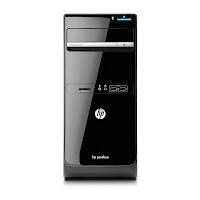
HP Pavilion p6-2390 Desktop has just the right technology for tackling your every day needs, plus it delivers responsive, reliable performance, smooth HD video playback, HP Pavilion p6-2390 Desktop PC quicker web browsing and media playback. This desktop PC includes a DVD burner and a front-panel 6-in-1 media card reader. Its also HP Multi-Display capable, so you can work on two monitors at once.
you can buy HP Pavilion p6-2390 Desktop from many big retailers offline or online like amazon, Best buy, Target, Walmart etc, But which store is the best,we have done work for you, we find the best place to buy HP Pavilion p6-2390 Desktop PC at Amazon.com


HP Pavilion p6-2390 Desktop Features

  • Intel Pentium_G640|#Pentium G640 Processor 2.8 GHz (3 MB cache)
  • 4GB DDR3
  • 500 GB 7200 rpm Hard Drive0 GB Solid State Drive
  • Windows 8
  • Item dimensions 19.53 x 9.45 x 20.39 inches
For more info. about HP Pavilion p6-2390 Desktop PC Review Visit This Link


HP Pavilion p6-2390 Desktop Review Images

HP Pavilion P6-2390 Desktop ReviewHP Pavilion p6-2390 Desktop PC ReviewHP Pavilion P6-2390 Desktop


HP Pavilion p6-2390 Desktop Video


HP Pavilion p6-2390 Desktop 2nd best Seller in amazon.com on 21-11-2012


* CERTAIN CONTENT THAT APPEARS ON THIS SITE COMES FROM AMAZON SERVICES LLC. THIS CONTENT IS PROVIDED "AS IS" AND IS SUBJECT TO CHANGE OR REMOVAL AT ANY TIME.* This site is a participant in the Amazon Services LLC Associates Program, an affiliate advertising program designed to provide a means for sites to earn advertising fees by advertising and linking to amazon.com Amazon and the Amazon logo are trademarks of Amazon.com, Inc. or its affiliates.
Read More..