McAfees Predicted Security Threats for 2010

Sabtu, 28 Juni 2014

McAfees Predicted Security Threats for 2010

McAfee recently released a report that predicts potential online security threats for 2010. To summarize, the anti-virus and computer security company, which is based out of Santa Clara, California, sees an increase in threats from social networking sites, banking security, and bot nets. In addition, they see increases in attacks targeting users, businesses, and applications. However, the findings werent all negative. McAfee says they expect an increase in law enforcement and its effectiveness in fighting cybercrime.

As social networking sites, such as Facebook and Twitter, become increasingly popular, theyll most likely become a breeding ground for cyber attacks. On top of the increased number, the attacks will be more sophisticated. Facebook users are particularly vulnerable due to the number of third party applications used. Games and other applications are popular and most people will trust an invitation from their friends without using caution. But that invitation could easily be malware or something else designed to harm your computer. Theres really no way to protect yourself other than avoiding the third party apps such as quizzes and games.

URL shorteners such as bit.ly and tinyurl.com are also expected to become a target of cybercrime. These tie-in to social networking because most people use them to post links to their profiles. The websites shorten a normal URL into a smaller one that will fit in almost any space and is especially popular on Twitter, where you only have 140 characters to gets your message across. One major problem with these smaller URLs is that they cant be previewed, so clicking on one at random could lead you to somewhere you dont want to be. This makes it a very easy target for crooks.

Due to the popularity of Microsoft products, cyber criminals have been taking advantage of them for years. However, as programs such as Adobe Reader and Flash become more popular, McAfee expects they will become a bigger target, taking over the top "honor" from Microsoft. In 2009, Adobe Reader saw an increase of problems due to security holes, leading the company to take a more proactive approach to patching up problems.

Email attachments have always been a problem when it comes to spreading malware and that threat is expected to continue and even get bigger. The company expects an increase in specific targets when it comes to email, and those include journalists, corporations, and individual users who could easily be convinced to download an attachment that is hiding a Trojan or other bit of malware.

Other projected problems include banking Trojans. Normally used to get your financial information, McAfee expects them to become so advanced that they will start interrupting transactions and even withdrawing money from your accounts. 2009 already saw an increase in banking cybercrime, with many Trojans making their way past strong bank security. Botnets are also expected to be a threat. McAfee calls them a "leading infrastructure for cybercriminals" and says they are "used for actions from spamming to identity theft." While they are harder to track down due to their ability to move from computer to computer without a central base of operation, there has been some recent success in shutting them down.

Despite all the many threats, McAfee does project an increase in law enforcements ability to track down cybercriminals. Even so, there are steps you should take to protect yourself. Purchasing security software and keeping it updated is very important and something everyone should do. Keeping your PC up-to-date with Microsoft patches that protect your operating system, office suite, and browser is also important. You should also be sure that you are aware of all the latest threats and realize whats at risk. Exercise caution when opening files or downloading applications.


Looking for Computer / PC Rental information? Visit the www.rentacomputer.com PC Rental page for your short term business PC needs. Or see this link for a complete line of Personal Computer Rentals.

Read More..

Konig 2 0 USB Powered Speaker

Jumat, 27 Juni 2014


Konig 2 0 USB Powered Speaker


Konig 2 0 USB Powered Speaker is one of the bestseller product in the market today. People arround United Kingdom is looking for Konig 2 0 USB Powered Speaker with low prices from Internet. If youre lucky you can get a special discount from Amazon, only in this month. Well, good product that comes with low prices is everyone choices.

For sale now at cheap price, special discounts and super shipping. Im really pleased with their features and highly recommend it to someone searching for a high quality item with the useful features at an reasonable. You can read testimony from customers to find out more through their experience. Konig 2 0 USB Powered Speaker has worked wonders for me and I believe it will do wonders on you too. So why waste much more time? Have Fun, you understand where to purchase the best ones.

Most of the customer reviews speak that the Konig 2 0 USB Powered Speaker are splendid luggage. Also, It Is a pretty well product for the price. It’s great for colony on a tight budget. We’ve found pros and cons on this type of product. But overall, It’s a supreme product and we are well recommend it! When you however want to know more details on this product, so read the reports of those who have already used it.


Konig 2 0 USB Powered Speaker is a good choice with brand new features that will make you amaze. But if you still want to have another information about Konig 2 0 USB Powered Speaker, you can read more detail information, spesification, and reviews from people that bought Konig 2 0 USB Powered Speaker below.

Konig 2 0 USB Powered Speaker Detail Information :


This Page is a participant in the Amazon Services LLC Associates Program, an affiliate advertising program designed to provide a means for sites to earn advertising fees by advertising and linking to Amazon.co.uk
CERTAIN CONTENT THAT APPEARS ON THIS SITE COMES FROM AMAZON SERVICES LLC. THIS CONTENT IS PROVIDED "AS IS" AND IS SUBJECT TO CHANGE OR REMOVAL AT ANY TIME.

Read More..

How to Remove Total Protect Uninstall Guide

Kamis, 26 Juni 2014

Total Protect is a fake antivirus program that generate misleading pop-up warnings, reports non-existent security threats on your computer and attempts to trick you in to buying software to remove viruses and other malicious software. This rogue anti-virus product can also slow your computers performance significantly and block legitimate programs or Windows tools. There are literally hundreds of fake AVs on the Internet meant to scare people into installing additional malware on their computers and giving their credit card numbers to cyber criminals. Total Protect is made to look like Microsoft Security Essentials, but its not legitimate. If your computer does become infected by this fake anti-virus program, please scan your computer with anti-malware software. To remove Total Protect from the computer, please follow the removal instructions below.


Total Protect - Professional Antivirus Solution typically appears when you visit a fake online virus scanner or infected website. However, scam artists use social engineering to trick users into installing malicious software as well. If you have stumbled onto a fake security scanner or fake pop-up alert saying that your computer is infected – dont click anything and close your web browsers. Unfortunately, cyber criminals also use drive-by downloads and software exploits to install Total Protect malware and other viruses on the computer even without users knowledge and consent. Thats why you should always enable your anti-virus software and keep it up to date and active.

Fake Total Protect security alerts:


The official website of this rogue antivirus software is totalprotectav.com. Its a mixed up website, some parts are clearly taken from legitimate antivirus vendors websites. For example, they use Bit Defender logo and they also claim that Kaspersky, Panda, Avira and some others are their partners. Thats a complete lie.


Important: never enter your credit card or personal information into a program like Total Protect. If you have already bought this rogue anti-virus program, please contact your credit card company and dispute the charges. Then do a full scan with an up-to-date reputable antivirus software. Coming across such fake antivirus software as Total Protect can be scary, but it actually cant delete your files or spy on your computer unless it comes bundled with other malware but its really uncommon. If your computer is infected with Total Protect, please follow the steps in the removal guide below to remove it from your computer. If you have any questions or need help removing this fraudware, please leave a comment below. Good luck and be safe online!


Total Protect removal instructions:

1. Reboot your computer is "Safe Mode with Networking". As the computer is booting tap the "F8 key" continuously which should bring up the "Windows Advanced Options Menu" as shown below. Use your arrow keys to move to "Safe Mode with Networking" and press Enter key. Read more detailed instructions here: http://www.computerhope.com/issues/chsafe.htm


NOTE: Login as the same user you were previously logged in with in the normal Windows mode.

2. Download free anti-malware software from the list below and run a full system scan.
NOTE: in some cases the rogue program may block anti-malware software. Before saving the selected program onto your computer, you may have to rename the installer to iexplore.exe or winlogon.exe With all of these tools, if running Windows 7 or Vista they MUST be run as administrator. Launch the program and follow the prompts. Dont forget to update the installed program before scanning.

3. New threats appear every day. In order to protect your PC from such (new) infections we strongly recommend you to use ESET Smart Security.


Associated Total Protect files and registry values:

Files:

Windows XP
  • C:Documents and Settings[UserName]Application DataRtlDriver32.exe
Windows Vista/7
  • C:Users[UserName]AppDataRoamingRtlDriver32.exe
Registry values:
  • HKEY_CURRENT_USERSoftwareMicrosoftWindowsCurrentVersionRun "[SET OF RANDOM CHARACTERS].exe"
Share this information with other people:
Read More..

What You Should Know About Forefront Identity Manager

Rabu, 25 Juni 2014

By Rhea Solomon


There is no organization that is able to stand to its feet without dedicated forefront identity manager . This is because there is nobody to oversee the work of others and motivate them to work harder. Talk of goals and objectives too whereby it will be like working towards nowhere. Hence there is need for administration of any organization for all work to run smoothly and efficiently.

In its broader view it means the organizing and coordinating of activities of the business so that a business organization is able to meet its objectives and goals. For this to happen there should be factors of production available and the principal to administer this.

But for the managers to do these functions as required, they are supposed to have skills, knowledge and experience on the same. Some of skills include conceptual skills, communication skills, human relations and technical skills. Technical skills is the professionalism and expertise they have that can be used to aid performance of various duties. Where the employees have no know9how, the manager can come in to assist them.

Human relations skills however are the most important. They go hand in hand with the staffing function. The skills are required so that the manager gets to know how to handle the employees in the organization; treating them fairly and motivating them so that they can be satisfied with the job environment for them to be more productive. Harsh managers are likely to build a poor working relationship with the manager and they are likely to produce poor results.

Controlling is another important function. It involves monitoring of activities and taking necessary measures to deal with any deviations if any. The manager does this by visiting all departments to see if there is any working on less capacity or identify any hitch in the entire production activities. This will avoid waste as some employees may not be keen in the production process. The manager can also use their skills to foresee any sides that are likely to reduce production to affect the business negatively and then take a necessary course of action.

Controlling is also another function that is supposed to be done by the managers. It involves monitoring the activities and operations in different departments to identify any deviations from what is planned and necessary measures taken to make it right. The manager identifies the department that is not working and decides on what to do. However problematic areas can be identified earlier enough and right measures taken.

At times the managers will need to delegate their power and authority to their juniors for a variety of reasons. They may want to relieve themselves from some work they do in the organization. They may also want to give the juniors a chance to prove themselves so that they can feel part and parcel of the firm.

Given the many advantages of forefront identity manager in management, it is a tool that should be used in every organization. It enables the business to compete in the market appropriately. Also it makes living standards grow and the economy due to more productivity.


About the Author:


Read More..

LAPTOP RESUME RECHARGEABLE PORTABLE SPEAKER

Senin, 23 Juni 2014


LAPTOP RESUME RECHARGEABLE PORTABLE SPEAKER


LAPTOP RESUME RECHARGEABLE PORTABLE SPEAKER is one of the bestseller product in the market today. People arround United Kingdom is looking for LAPTOP RESUME RECHARGEABLE PORTABLE SPEAKER with low prices from Internet. If youre lucky you can get a special discount from Amazon, only in this month. Well, good product that comes with low prices is everyone choices.

Available now at affordable price, special discounts and super shipping. Im very satisfied with their features and recommend it to someone looking for a quality product with the newest specifications at an cheap. You can read review from buyers to find out more from their experience. LAPTOP RESUME RECHARGEABLE PORTABLE SPEAKER has worked beneficial for me and I believe it would do wonders on you too. So why waste any more time? Have Fun, you know where to purchase the best ones.

Most of the customer reviews speak that the LAPTOP RESUME RECHARGEABLE PORTABLE SPEAKER are splendid luggage. Also, It Is a pretty well product for the price. It’s great for colony on a tight budget. We’ve found pros and cons on this type of product. But overall, It’s a supreme product and we are well recommend it! When you however want to know more details on this product, so read the reports of those who have already used it.


LAPTOP RESUME RECHARGEABLE PORTABLE SPEAKER is a good choice with brand new features that will make you amaze. But if you still want to have another information about LAPTOP RESUME RECHARGEABLE PORTABLE SPEAKER, you can read more detail information, spesification, and reviews from people that bought LAPTOP RESUME RECHARGEABLE PORTABLE SPEAKER below.

LAPTOP RESUME RECHARGEABLE PORTABLE SPEAKER Detail Information :


This Page is a participant in the Amazon Services LLC Associates Program, an affiliate advertising program designed to provide a means for sites to earn advertising fees by advertising and linking to Amazon.co.uk
CERTAIN CONTENT THAT APPEARS ON THIS SITE COMES FROM AMAZON SERVICES LLC. THIS CONTENT IS PROVIDED "AS IS" AND IS SUBJECT TO CHANGE OR REMOVAL AT ANY TIME.

Read More..

Remove Safehomepage com removal instructions

Minggu, 22 Juni 2014

Safehomepage.com is a browser hijacker that will alter your web browsers settings. It will change your home page and default search engine provider. It can also hijack your web browser shortcut and install additional software onto your computer. So, how do you recover from it if youve been hijacked? Read on as this article is going to take a look at exactly that.


First of all, browser hijacking is an irritating practice whereby malware and unscrupulous websites change your browser settings without your knowledge or permission. In other words the malware or website hijacks or kidnaps your browser. This is just as frustrating as it sounds because what this means is that you will be subjected to one, most or all of the following annoyances:
  • Your browsers home page will have changed from the one that you usually use – for example Google, Yahoo or Bing – to one not of your choosing, in this case safehomepage.com
  • The search engine that you use when browsing the web will suddenly start redirecting you to websites that you have no interest in visiting.
  • Some of the other websites that you visit may also redirect you to different sites
  • Your computer screen will very likely be flooded with a constant stream of pop-up adverts or advertising banners
  • You may have had a strange tool bar installed on your browser which rather than adding any extra functions is annoying and unusable
  • Your bookmarks or favorites folders may suddenly be populated with dozens, if not hundreds, of URLs to websites that you have never even visited, let alone saved as a favorite.
If your home page of choice has been hijacked and is forcing you to use a home page against your will then you naturally will want to resolve the issue. But how do you do that? First of all it’s useful to know how browser hijacking takes place.

Safehomepage.com will find its way on to your computer system along with freeware and fake installers. Fake installers are distributed in various ways. If you got a notification from a web page saying that your Flash player is outdated then you probably visited a bogus site promoting fake installers, read more here. This browser hijacker is also promoted on various software download sites. Not the most popular ones but still with enough traffic to infection thousands of PCs in different countries. It is usually presented as an offer before the actual download begins.

This would be a good time to say that if you don’t have anti-virus, anti-spyware or another type of security software installed on your PC then you should do this as a matter of urgency. Having a reputable security program on your PC is your first and best line of defense against being infected by any of the numerous types of malware that are out there, not just browser hijackers.

So, you’ve run your anti-malware or other security program a couple of times and rebooted your PC or laptop but your home page and search engine are still redirecting you to safehomepage.com? This means that the problem could have been caused by an application which was installed without your knowledge or permission and that is hidden deep somewhere within your computer’s system. Please follow the removal instructions below, this hopefully will help you get rid of the hijack and restore your computer.

If you’re still having trouble, don’t panic – browser hijackers, including safehomepage.com, are designed to be as difficult as possible to find and uninstall so please leave a comment below and I will try to to help you. Good luck and be safe online!


Safehomepage.com removal instructions:

1. First of all, download recommended anti-malware software and run a full system scan. It will detect and remove this infection from your computer. You may then follow the manual removal instructions below to remove the leftover traces of this browser hijacker. Hopefully you wont have to do that.

2. Uninstall Safehomepage.com and related programs from your computer using the Add/Remove Programs control panel (Windows XP) or Uninstall a program control panel (Windows 7 and Windows 8).

Go to the Start Menu. Select Control Panel → Add/Remove Programs.
If you are using Windows Vista or Windows 7, select Control Panel → Uninstall a Program.


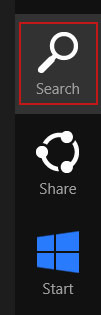
If you are using Windows 8, simply drag your mouse pointer to the right edge of the screen, select Search from the list and search for "control panel".


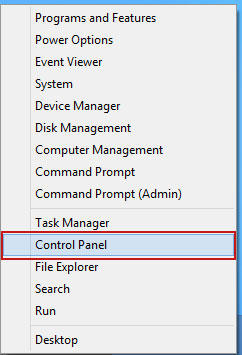
Or you can right-click on a bottom left hot corner (formerly known as the Start button) and select Control panel from there.


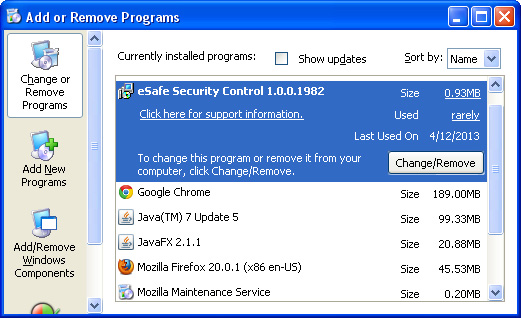
3. When the Add/Remove Programs or the Uninstall a Program screen is displayed, scroll through the list of currently installed programs and remove QType, eSave Security Control, Safehomepage, New Tabs Uninstall, Desk 365, BrowserProtect and any other recently installed application. As I said earlier, this application is rarely listed as Safehomepage in the currently installed programs list. So, either look for applications mentioned here or try to remember what software you installed recently. Its probably the culprit.


Simply select the application and click Remove. If you are using Windows Vista, Windows 7 or Windows 8, click Uninstall up near the top of that window. When youre done, please close the Control Panel screen.


Remove Safehomepage.com from Google Chrome:

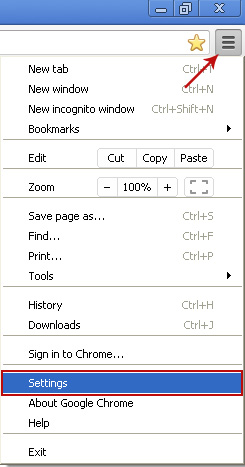
1. Click on Customize and control Google Chrome icon. Select Settings.


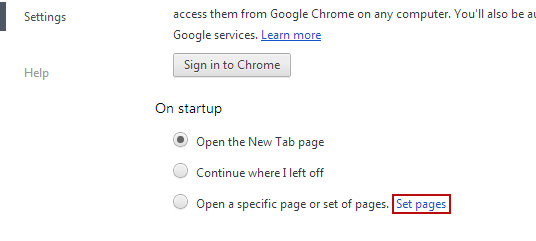
2. Click Set pages under the On startup.


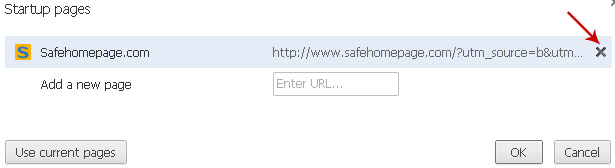
Remove safehomepage.com by clicking the "X" mark as shown in the image below.


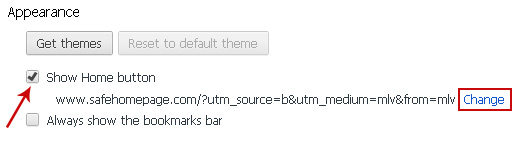
3. Click Show Home button under Appearance. Then click Change.


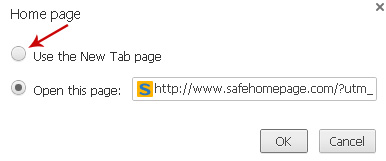
Select Use the New Tab page and click OK to save changes.


4. Click Manager search engines button under Search.

Select Google or any other search engine you like from the list and make it your default search engine provider.

Select Safehomepage.com from the list and remove it by clicking the "X" mark as shown in the image below.

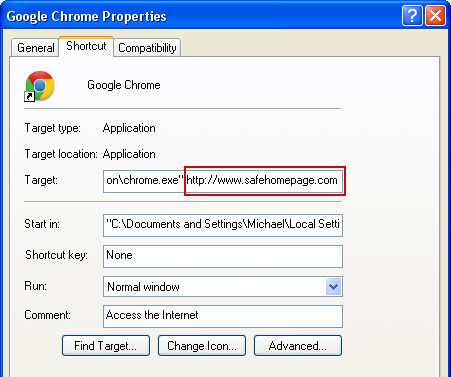
5. Right-click the Google Chrome shortcut you are using to open your web browser and select Properties.

6. Select Shortcut tab and remove "http://www.safehomepage.com...." from the Target field and click OK to save changes. Basically, there should be only the path to Chrome executable file. Nothing more.


Remove Safehomepage.com from Mozilla Firefox:

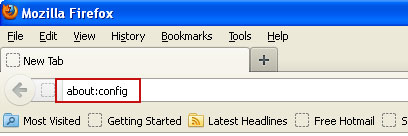
1. In the URL address bar, type about:config and hit Enter.


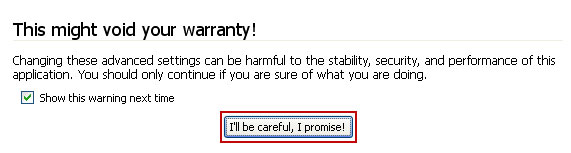
Click Ill be careful, I promise! to continue.


In the search filter at the top, type: Safehomepage

Now, you should see all the preferences that were changed by safehomepage.com. Right-click on the preference and select Reset to restore default value. Reset all found preferences!

You can also use the Reset Firefox feature.

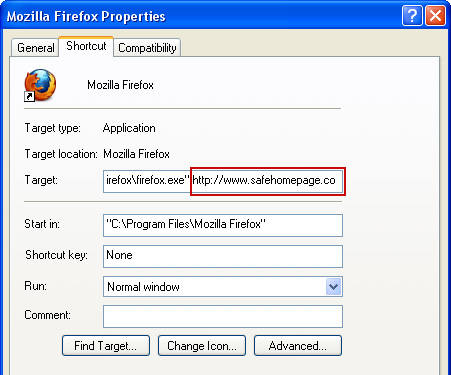
2. Right-click the Mozilla Firefox shortcut you are using to open your web browser and select Properties.

3. Select Shortcut tab and remove "http://www.safehomepage...." from the Target field and click OK to save changes. Basically, there should be only the path to Firefox executable file.


Remove Safehomepage.com in Internet Explorer:

1. Open Internet Explorer. Go to Tools → Manage Add-ons.


2. Select Search Providers. First of all, choose Live Search search engine and make it your default web search provider (Set as default).

3. Select Safehomepage.com and click Remove to remove it. Close the window.

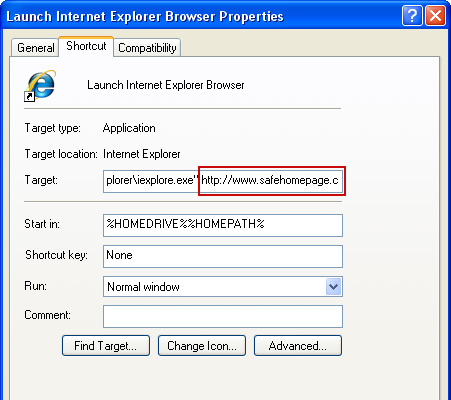
4. Right-click the Internet Explorer shortcut you are using to open your web browser and select Properties.

5. Select Shortcut tab and remove "http://www.safehomepage.com...." from the Target field and click OK to save changes. Basically, there should be only the path to Internet Explorer executable file.


6. Finally, go to Tools → Internet Options and restore your home page to default. Thats it!
Read More..

Autodesk FreeWheel 2D 3D Viewer Google Chrome extension gallery

Sabtu, 21 Juni 2014

Autodesk FreeWheel 2D/3D Viewer - Google Chrome extension gallery

Have you ever wanted to share your CAD files with others, but they dont have AutoCAD or Trueview? Make a DWF file of your drawings and use Autodesk FreeWheel. Your clients, vendors, or remote offices can view your drawings through their Web Browser. Google Chrome has an extension that can be added to the browser that allows them to view DWF and DWFx files. So does Firefox.

Just an idea that I thought Id share with you.
Read More..